

Create your private profile, invite the other parent, and set permissions for who can see what.
- Only the two parents can communicate — unless you choose to allow access for your solicitor, a guardian ad litem, or another approved professional.
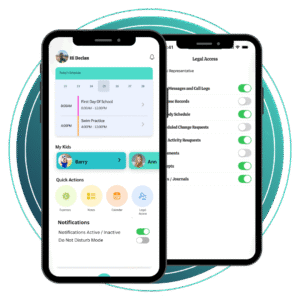
Use the shared calendar to log:
- Weekly parenting schedules
- School drop-offs/pickups
- Holidays and special occasions
- Medical appointments and extracurriculars
Everything is colour-coded, time-stamped, and automatically updates for both users.
No more text messages, DMs, or email threads.
Use the in-app messaging tool to communicate clearly and appropriately.
- All messages are stored and timestamped. Nothing can be edited or deleted — keeping things clear, professional, and court-friendly.
Store important info in the Document Vault, such as:
- Birth certificates
- School reports
- Doctor’s notes
- Court orders
You can both access what’s needed — without having to ask (or argue).
Keep a fair record of shared costs — whether it’s school books, shoes, or summer camp.
Log payments, request splits, and see a full history of who paid what, when.
Need to record an incident, note something said, or track patterns over time?
Use your Private Journal to write reflections, observations, or key details — just for your own record.
Need to provide access to a solicitor, mediator, or guardian ad litem?
You can grant professional view-only access to your calendar, messages, and journal entries — all in one place.
This transparency supports child-focused decisions and can help de-escalate conflict in legal settings.